Description
Home » SHOP » FLIGHT CONTROLS » CH PRODUCTS » FLIGHT STICK PRO – JOYSTICK
FLIGHT STICK PRO – JOYSTICK
Distinctive features
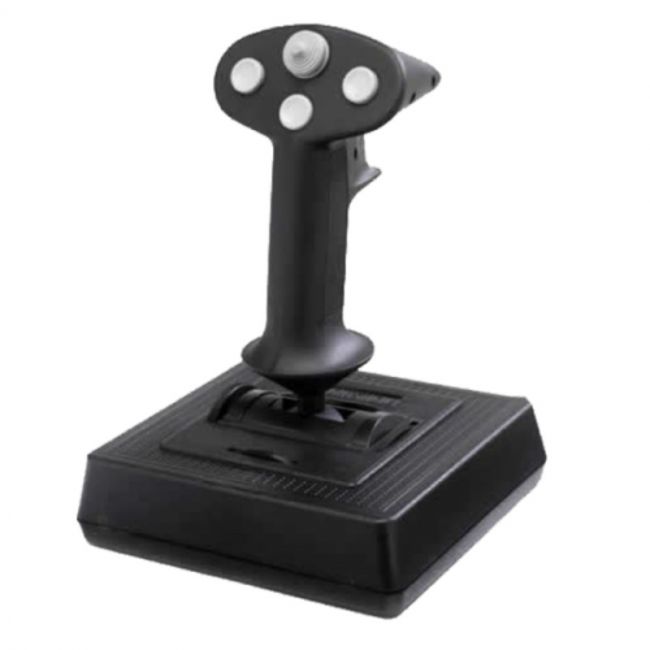
The CH Flightstick Pro (FLIGHT STICK PRO JOYSTICK) is the legacy controller where it all began. With three axis, four buttons and a one 8-way POV hat switch, this comfortable ambidextrous controller gives you just enough functions to satisfy your gaming needs.
KEY FEATURES:
- Three axis and 4 buttons
– X, Y and Z axis for aileron, elevator and throttle control
– 4 traditional push buttons and 1 eight -way POV hat switch
- Total of 16 programmable functions with Control Manager software (included)
- Comfortable ambidextrous handle for both right and left handed use
- Dual rotary trim wheels for precise adjustment of ailerons and elevators
- Side throttle wheel
- Large, sturdy base with non-skid feet
- Plug and Play driverless USB installation with 7 foot USB cable for both PC and Macintosh
- Compatible with Windows 98, 2000, XP, Vista, 7, 8, 10 and Mac OSXWHERE TO BUY
Typical Applications
CONTROL MANAGER Software Download-
Version 4.xx
Download the current version of Control Manager Software here.
PLEASE NOTE: This software is programming software only. NOT DEVICE DRIVERS! If you are unsure if you need this software, do not install.
Introduction
The Control Manager software allows a user to program their CH USB devices. The CH Control Manager currently supports the following CH USB devices.
• Eclipse Yoke
• Multi Function Panel (MFP)
• Fighterstick
• Combatstick
• Flightstick Pro
• Flight Sim Yoke
• Pro Throttle
• Throttle Quadrant
• Pro Pedals
• Trackball Pro (DT225)
Limitations
The Control Manager is compatible with Windows 98, ME, 2000, XP, XP 64bit Edition, Windows Vista (all editions), as well as Windows 7, 8 (all editions) and 10. It is only compatible with CH USB devices.
Installation Instructions
VERY IMPORTANT !!!
Before installing the newest version of Control Manager, be sure to uninstall any previous versions from your computer. Also, be sure that any anti-virus software is disabled.
How do I install the Control Manager?
Select your version of Windows from the drop down menu and click on the “DOWNLOAD” button to begin downloading the CH Control Manager.
Reviews
There are no reviews yet.